Sharing the cleaning schedule with your staff
What matters in sharing a cleaning schedule is reducing your staff's friction to zero. Anything that requires installing an app or creating an account tends not to stick — especially with outsourced or older staff.
A share link (recommended)
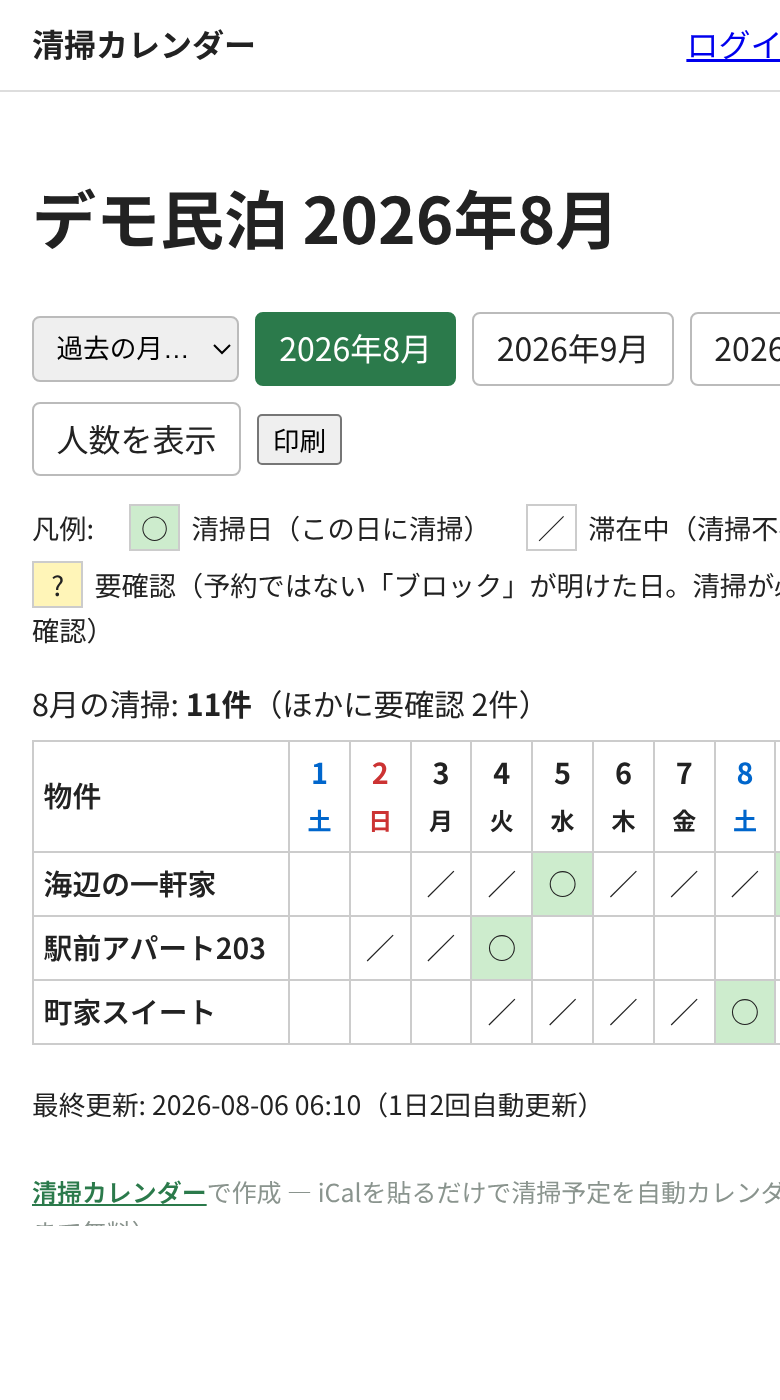
Send one URL once; staff open it any time and always see the current schedule. No accounts, no apps — it works in any phone browser. Seisou Calendar's share URL is an unguessable random string, and the page shows only dates, marks and (optionally) guest counts — never guest names or contact details, so handing it to external staff raises no privacy concerns.
Messaging apps
Cleaning crews live in chat — LINE in Japan, WhatsApp or Messenger elsewhere. Pin the share link in the group chat. Sending each day's schedule as a message fails the day you forget to send it; a pinned always-current link doesn't.
A printed sheet
Post the month on the wall of the storage room or office. The share page has a print layout that fits a month per sheet. A printout is a snapshot — last-minute changes won't appear — so pair it with a routine (reprint weekly, message the exceptions).
Explain the marks once
The calendar uses three marks: ○ = cleaning day (checkout), / = guest staying (no cleaning), ? = a blocked period just ended (check with the owner). Explain those once and the calendar needs no further words — in any language.
Put that URL to work
Paste your iCal URLs into Seisou Calendar and every property's cleaning days (checkout days) appear on one monthly calendar, shared with your cleaning staff through a single link — no staff accounts needed. Free for up to 10 properties.